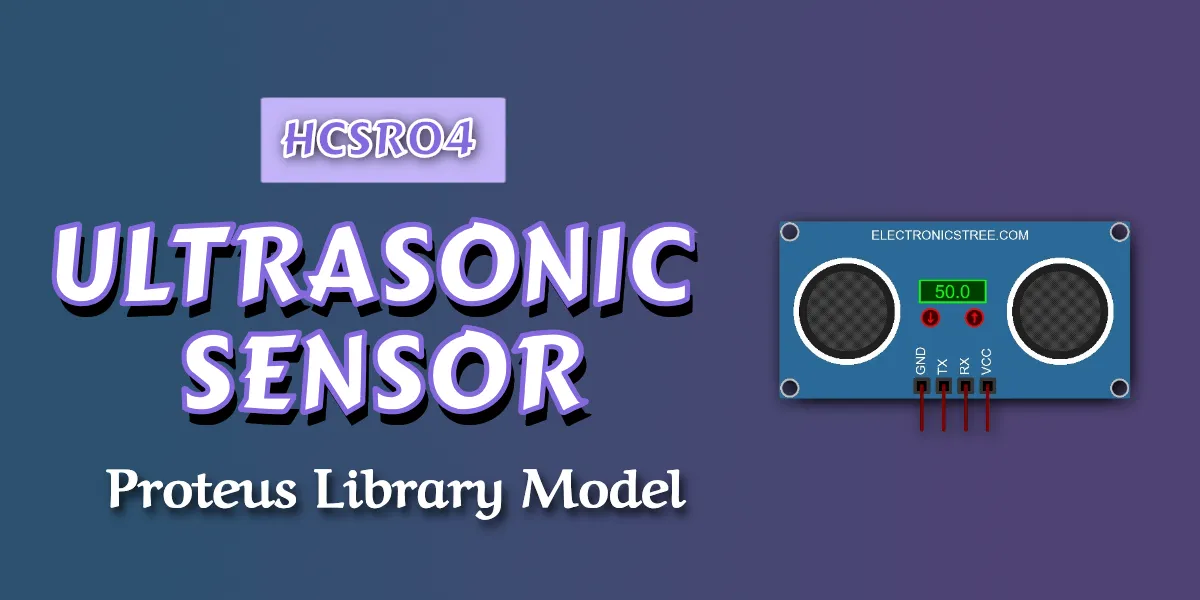
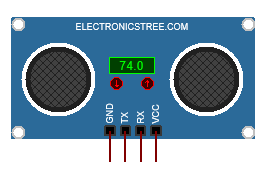
HCSR04 ultrasonic sensor simulation model is a virtual representation of a real ultrasonic sensor, designed to reproduce its logical and communication behavior inside a circuit simulation environment such as Proteus Design Suite. Unlike a physical ultrasonic sensor, which emits acoustic waves and measures the time required for echoes to return, the simulation model replaces the acoustic process with deterministic digital logic. Its purpose is not to model sound propagation, but to accurately emulate the data output format, operational response, and timing behavior that a microcontroller would experience when connected to an actual device.
Measurement Representation
In this simulation model, distance is derived from user inputs (via arrow marker buttons) rather than actual echo timing. The entered value serves as a raw measurement equivalent and is linearly scaled to map the digital range onto the sensor’s defined minimum and maximum distance limits. This ensures smooth transitions, optimal resolution usage, and consistent behavior during testing.
Because the HCSR04 Ultrasonic Sensor model operates in a purely digital domain, it avoids environmental influences such as temperature variation, humidity, or acoustic reflection properties. This makes the simulation deterministic and repeatable, which is ideal for firmware validation.
HCSR04 Ultrasonic Sensor Operational Modes
The model supports two primary modes of operation: automatic mode and manual mode.
In automatic mode, the system continuously monitors the input value. Whenever the input changes, the model recalculates the corresponding distance and transmits a new data frame. This behavior simulates a continuously updating sensor. In manual mode, the model waits for a trigger command on its receive (RX) line before transmitting the current distance. This mode simulates sensors that operate on request, allowing the controller to determine when measurements are sent.
These two modes provide flexibility for different embedded system designs and testing scenarios.
Communication Behavior
The HCSR04 Ultrasonic Sensor simulation model includes a UART transmission engine. Communication is configured for 9600 baud, 8 data bits, no parity, and one stop bit (8N1 format). The transmission sequence strictly follows standard UART timing: a start bit, eight data bits transmitted least significant bit first, and a stop bit.
To ensure proper operation within the simulation environment, transmission events are scheduled with precise time separation. Correct timing guarantees that connected microcontroller models sample the data accurately without bit misalignment or checksum errors.
HCSR04 Ultrasonic Sensor Frame Structure
Each measurement is transmitted as a structured four-byte frame. The first byte is a fixed header value used for frame synchronization. The second and third bytes represent the high and low portions of the calculated distance value. The fourth byte is a checksum, computed as the modulo-256 sum of the previous three bytes.
This simple frame structure allows reliable communication and easy verification on the receiving side. Firmware can validate incoming data by recalculating the checksum and comparing it with the transmitted value.
| Byte Index | Content |
|---|---|
| 0 | Header (0xFF) |
| 1 | Distance High Byte |
| 2 | Distance Low Byte |
| 3 | Checksum |
Checksum Calculation
Checksum=(Header+HighByte+LowByte)mod256The receiving system must verify the checksum to validate the frame.
HCSR04 Ultrasonic Sensor Simulation

To use the model with an Arduino (for example Arduino Uno), connect the pins as follows:
- Sensor TX → Arduino RX
- Sensor RX → Arduino TX (only required in MANUAL mode)
- Connect VCC and GND to their respective power terminals.
Example Arduino Code (AUTO Mode Receiver)
#include <SoftwareSerial.h>

#define SENSOR_BAUD 9600
#define DEBUG_BAUD  9600

// Debug serial on pins 10 (RX), 11 (TX)
SoftwareSerial debugSerial(10, 11);

uint16_t distance = 0;

void setup()
{
  // Hardware Serial → Sensor
  Serial.begin(SENSOR_BAUD);

  // Software Serial → Debug terminal
  debugSerial.begin(DEBUG_BAUD);

  debugSerial.println("Ultrasonic AUTO Mode Receiver Started");
}

void loop()
{
  static uint8_t state = 0;
  static uint8_t H, L, CHK;

  while (Serial.available())
  {
    uint8_t b = Serial.read();

    switch (state)
    {
      case 0: // Wait for header
        if (b == 0xFF)
          state = 1;
        break;

      case 1: // High byte
        H = b;
        state = 2;
        break;

      case 2: // Low byte
        L = b;
        state = 3;
        break;

      case 3: // Checksum
        CHK = b;

        if (((0xFF + H + L) & 0xFF) == CHK)
        {
          uint16_t distance = ((uint16_t)H << 8) | L;

          debugSerial.print("Distance: ");
          debugSerial.print(distance);
          debugSerial.println(" cm");
        }
        else
        {
          debugSerial.println("Checksum Error");
        }

        state = 0;  // Always resync
        break;
    }
  }
}HCSR04 Ultrasonic Sensor Proteus Library Models
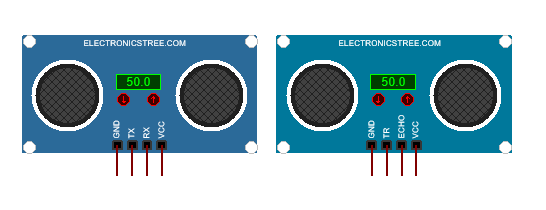
The HCSR04 ultrasonic sensor library has two models. One is UART-based, which we have already discussed. The other is the digital pulse-width output ultrasonic sensor with TRIG and ECHO pins.
This type of ultrasonic sensor is a pulse-echo distance sensor that measures distance using the time-of-flight principle. The microcontroller sends a short pulse to the TRIG pin, causing the sensor to emit an ultrasonic burst. The ECHO pin then outputs a pulse whose width corresponds to the time taken for the sound to reflect back from an object, allowing the distance to be calculated.
This is the same type that is available by default in Proteus. You can use whichever type of sensor you prefer.
Download Library
Simply click on the button to download the library. You can refer to this post for instructions on how to install the library in Proteus 8. How to Download and install Library in Proteus (electronicstree.com)
ZIP Password : electronicstree.com
We’re always looking to expand our library collection based on what our community needs. If you’re looking for a specific Arduino module, sensor, or component that we don’t currently offer, we’d love to hear from you!
Reach out to us at help@electronicstree.com with your requests. We prioritize new library development based on community demand, so your suggestion could be our next addition.
Join the official WhatsApp channel of ElectronicsTree to stay updated with the latest electronics tutorials, Proteus libraries, Arduino projects, and simulation resources.